Amazon Alexa Credited With Saving a Dog During a Housefire
The Amazon Alexa has become a useful tool in many households. You can use the device to do everything from turning off your outdoor lights to adding items to your grocery list, making it a must-have for busy households.
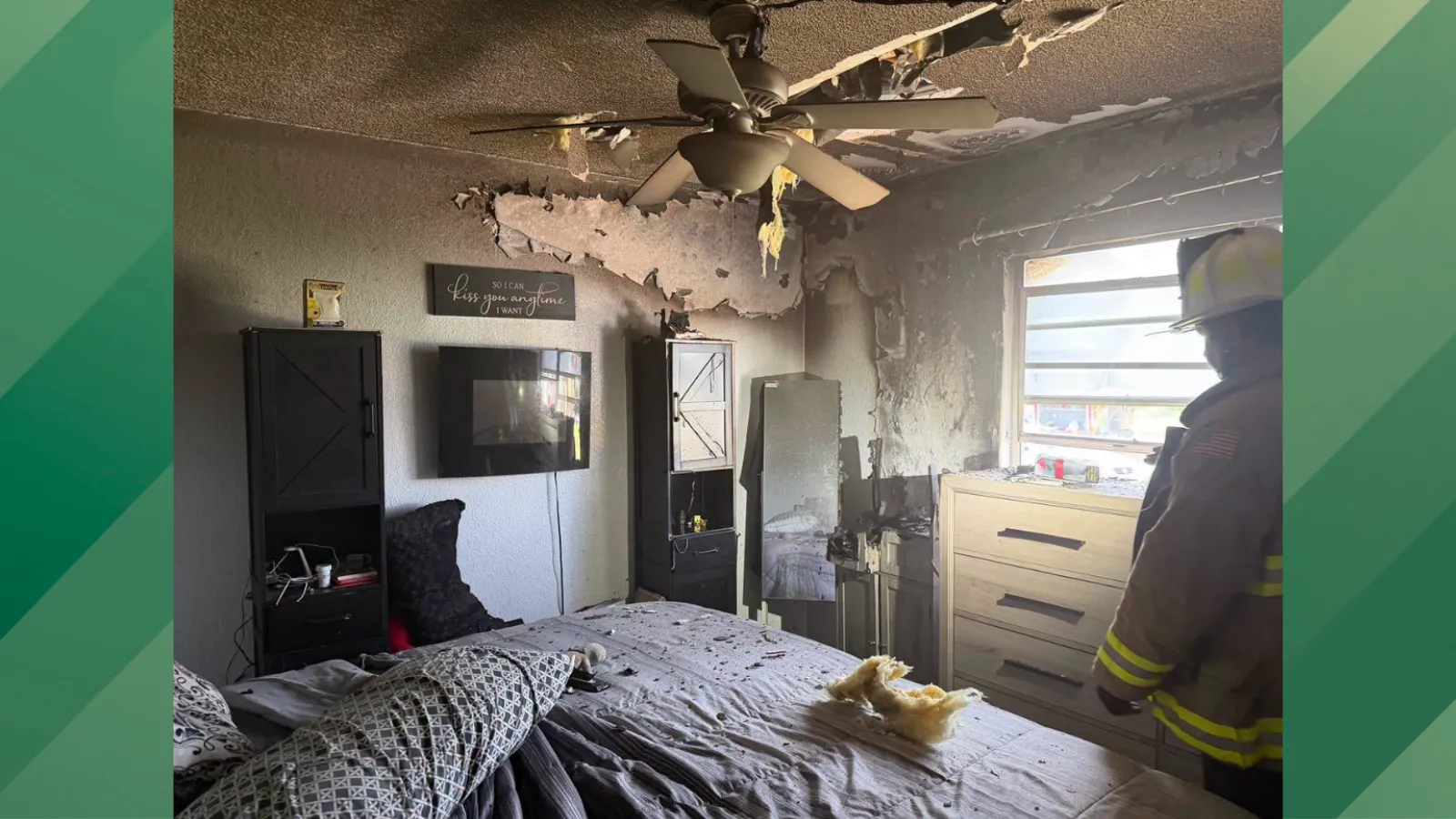
Now one Florida family may need to thank their Alexa camera system for saving the day after the device alerted them to a fire in their home. Hernando County Fire Rescue posted the story on its Facebook page on Sept. 23, along with several photos from the incident.
It’s easy to see the damage from the photos, which likely made this situation a lot scarier for the homeowner when they were finally able to get back inside their home. But the good news is that nobody was injured during the blaze.
And what’s even better is that the homeowner was alerted in time for the family dog to be saved, turning a potential tragedy into a success story.
The Alexa Alerted the Homeowner to the Smoke
Anyone who has an Alexa device may be curious about just how the device was able to inform the homeowner about the emergency. “The homeowner was alerted to smoke in the home from their Alexa camera system,” the Facebook post said. “When the homeowner checked the cameras, they observed smoke in the home and called 911.”
According to the post, firefighters found smoke coming from one of the bedrooms when they arrived, and they were able to quickly get it “knocked down.”
“One dog was rescued from the home,” the post continued. “No injuries were reported, and the cause is under investigation.”
People Shared Theories About the Fire in the Comments
Residents were quick to make assumptions about what caused the fire on the Facebook post, with many people blaming a small appliance or beauty device. And one person asked for an update about the cause, saying that she wanted to avoid the same fate.
“Please update about how it was started so we can learn too,” she wrote. “I hate leaving things plugged in, but it’s crazy to unplug them all, all the time.”
Alexa Emergency Assist Smart Alerts Need to Be Turned On
While it’s amazing that this story unfolded the way it did, it’s worth noting that the Alexa Emergency Assist Smart Alerts have to be turned on to work, according to the company’s website.
To do this, you need to go into your Alexa app, open the “More” option (three horizontal lines), select Alexa Emergency Assist, select Settings, and then select Smart Alerts. Once you’re in there, you can turn Smoke & CO Alarm Sounds on or off, which will allow you to be alerted when your Alexa detects an emergency.
You may need an upgraded plan or subscription to use this feature, so you’ll want to check your Amazon subscription to make sure you’re covered.